Creator features
Better Nested Scenes and UI Experience
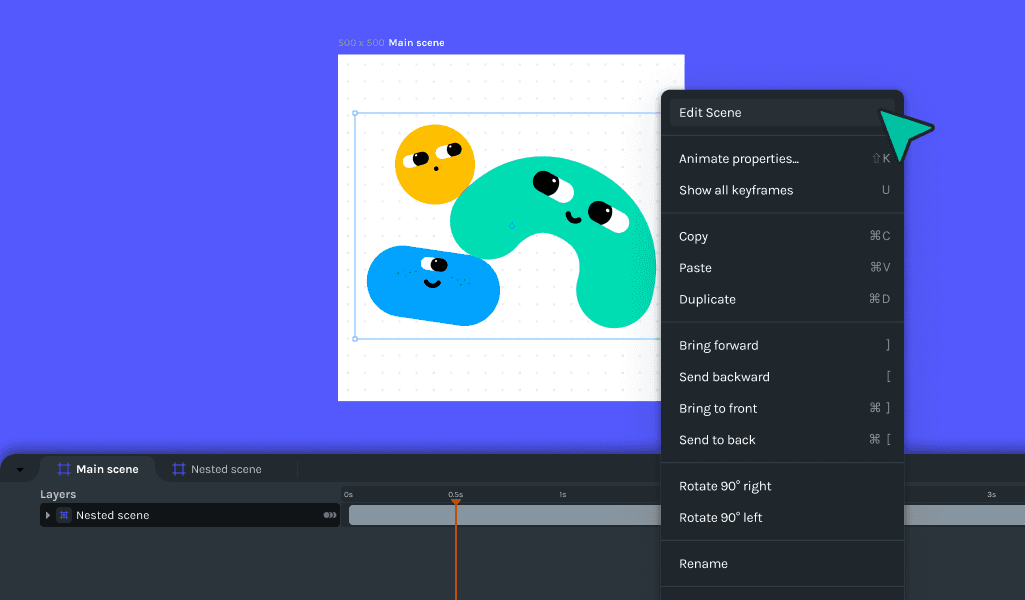
In this update, we added custom cursors, context menus, and visual feedback. Improvements include better scene names, and a simplified appearance. The software also fixed bugs related to multi-selection, playhead position, and canvas updates.
🎉 What's new
- Right-clicking a nested scene in the canvas will now show a context menu identical to the one in the timeline.
- Introduced custom cursors to enhance the user interface experience.
- Added visual feedback on the drop area in the upload section.
🔧Improvements
- Improved scene names and transform control visibility with the player.
- Select layers as soon as they are touched, and highlight layers in the selection.
- Refactor of the timeline component to minimize component renders.
- Simplified the appearance of a nested scene or a group.
- Changed appearance list to be virtualized for improved performance.
- Colors for active vertex have been updated for better visibility.
- The highlighted node on the timeline will not change anymore when the user is dragging.
- Updated copy and URLs for feature support in documentation and interfaces.
- Changed get started Lottie and SVG for a fresh look.
🪲Bug fixes
- Fixed the issue where the shape jumps out of screen when clicked.
- Addressed an issue with duplicate items causing confusion.
- Corrected multi-selection issues on the layers' panel, scaling multiple objects, and unintentional multi-selection.
- Fixed playhead position when scene duration is updated.
- Addressed a bug where the object jumps on the first drag.
- Resolved rendering not displaying items when the root level has a significant number of layers.
- Fixed a regression where the property panel didn't update after undo/redo actions.
- Corrected the display issues of the right-click menu on the timeline, including the incomplete display and incorrect positioning.
- Fixed an issue where the canvas was not updating correctly on keyframe changes.